Home

The Home tab of the ribbon menu contains frequently used functions.
Process

Information
Opens the Process Information Dialog for the current project.
Insert
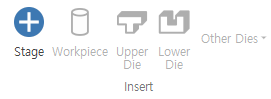
-
Stage
Adds a stage to the Project Explorer. -
Workpiece
Adds a workpiece item to each stage. -
Upper Die
Adds an upper die (+Y) to the selected stage. -
Lower Die
Adds a lower die (-Y) to the selected stage. -
Die (+X)- Adds a die in the+X direction. Die (-X)- Adds a die in the-X direction.Die (+Z)- Adds a die in the+Z direction.Die (-Z)- Adds a die in the-Z direction.
Model

Import Model- Used to import CAD files (STL / STEP / IGES).Analysis Result File- Used to extract geometry from per-stage analysis or existing analysis results.Nastran File- Used to import mesh files for Nastran analysis.-
Abaqus File- Used to import mesh files for Abaqus analysis. -
Auto Shape
Opens the Auto Shape Dialog.
Positioning

Positioner
Opens the Positioner Dialog to adjust the position of the model.
Analysis

-
Check
Activates the Simulation Pane, reviews the input data, and outputs warning or error messages.
If there are no errors, the Run button becomes enabled. -
Run
Saves the input data and starts the analysis.
Pane
-
Workspace
Enables/disables the Workspace. -
Library Explorer
Enables/disables the Library Explorer. -
Reset Panes
Resets the panes. Keeps only the default panes open and closes all others.