Insert

Insert
-
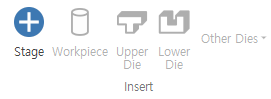
Stage
Adds a stage to the Project Explorer. -
Workpiece
Adds a workpiece item to each stage. -
Upper Die
Adds an upper die (+Y) to the selected stage. -
Lower Die
Adds a lower die (-Y) to the selected stage. -
Die (+X)- Adds a die in the+X direction. Die (-X)- Adds a die in the-X direction.Die (+Z)- Adds a die in the+Z direction.Die (-Z)- Adds a die in the-Z direction.
Model

Import Model- Used to import CAD files (STL / STEP / IGES).Analysis Result File- Used to extract geometry from per-stage analysis or existing analysis results.Nastran File- Used to import mesh files for Nastran analysis.-
Abaqus File- Used to import mesh files for Abaqus analysis. -
Auto Shape
Opens the Auto Shape Dialog.
Entity

-
Library Explorer
Enables/disables the Library Explorer. -
Material
Opens the Material Dialog to create material information. -
Press
Opens the Press Dialog to create press information. -
Friction
Opens the Friction Dialog to create friction information. -
Heat (Workpiece)
Opens the Heat (Workpiece) Dialog to create heat (workpiece) information. -
Heat (Die)
Opens the Heat (Die) Dialog to create heat (die) information. -
Die Property
Opens the Die Property Dialog to create die property information. -
Mesh Density
Opens the Mesh Density Dialog to create mesh density information. -
Boundary Condition
Opens the Boundary Condition Dialog to create boundary condition information. -
Die Wear
Opens the Die Wear Dialog to create die wear information. -
Load Limit
Opens the Load Limit Dialog to create load limit information. -
Pressure Die
Opens the Pressure Die Dialog to create pressure die information. -
Heat Treatment
Opens the Heat Treatment Dialog to create heat treatment information. -
Microstructure
Opens the Microstructure Dialog to create microstructure information.