View

Parts
-
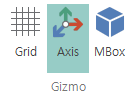
Grid
Enables/disables horizontal/vertical lines in the background. -
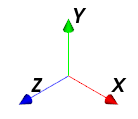
Axis
Enables/disables theAxisin the view screen.
-
Model Box
Enables/disables the bounding box of the selected shell.
Render
-
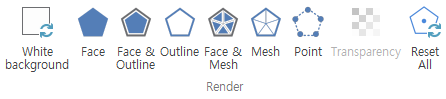
White Background
Enables/disables a white background for the view. When disabled, the original background is restored. -
Face
Renders the model faces filled with the assigned color. -
Face & Edge
Renders the model faces filled with the assigned color and also shows the edges. -
Edge
Renders only the edges of the model. -
Face & Element
Renders the model faces filled with the assigned color and shows all element lines that define the faces. -
Element
Renders all element lines that define the model faces. -
Node
Renders only the nodes of the model. -
Transparency
Opens the Transparency Dialog to set the model transparency. -
Reset
Resets the rendering state of all shells to default values.
Rotation
-
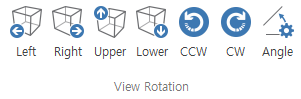
Left
Rotates the current view to theleftby the specifiedangle. -
Right
Rotates the current view to therightby the specifiedangle. -
Up
Rotates the current viewupwardby the specifiedangle. -
Down
Rotates the current viewdownwardby the specifiedangle. -
Counterclockwise
Rotates the current viewcounterclockwiseby the specifiedangle. -
Clockwise
Rotates the current viewclockwiseby the specifiedangle. -
Angle
Opens the Angle Dialog to set the rotation angle.
Direction

Front- Changes the view direction toFront.Back- Changes the view direction toBack.Left- Changes the view direction toLeft.Right- Changes the view direction toRight.Top- Changes the view direction toTop.Bottom- Changes the view direction toBottom.-
ISO- Changes the view direction toISO. -
User
Opens the Camera Dialog to save or activate the current camera angle.
Zoom
-
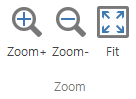
Zoom InZooms in on the current view. -
Zoom OutZooms out on the current view. -
FitFits the model to the screen.
Pane
-
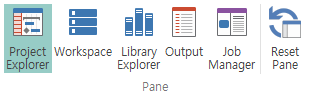
Project Explorer
Enables/disables the Project Explorer. -
Workspace
Enables/disables the Workspace. -
Library Explorer
Enables/disables the Library Explorer. -
Output Window
Enables/disables the Output Window. -
Job Window
Enables/disables the Job Window. -
Reset Panes
Resets the panes. Keeps only the default panes open and closes all others.
Bar

Status Bar
Enables/disables the status bar at the bottom of the program.