Library
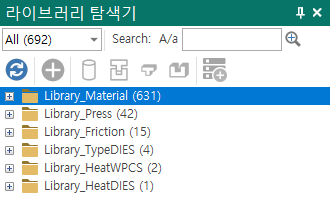
Search - Searches using the term entered in the edit box.Refresh - Re-reads the library path configured in [Option](../dialog/option.md] and displays it.Insert - Copies the item selected in the Library explorer to the location selected in the Project Explorer.To workpiece - Copies the selected item (object) to the workpiece in the Project Explorer.To upper & lower dies - Copies the selected item (object) to the upper and lower dies in the Project Explorer.To upper dies - Copies the selected item (object) to the upper die in the Project Explorer.To lower dies - Copies the selected item (object) to the lower die in the Project Explorer.To workspace - Copies the selected item (object) to the Workspace.