Process Information Dialog
The process information dialog is a dialog that defines the problem.
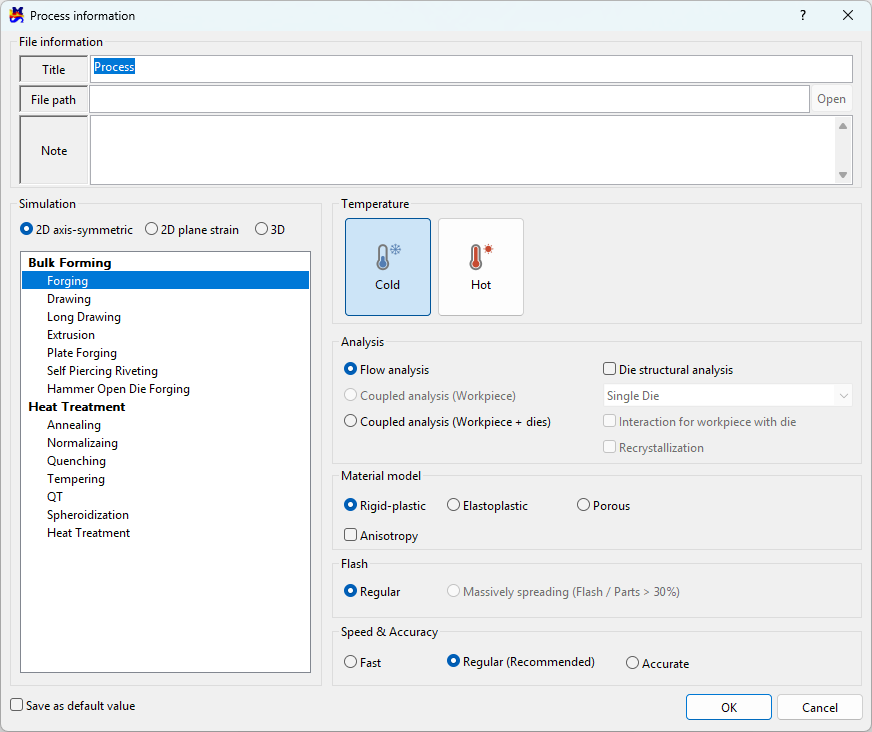
File information
Title
Enter the title of the current project.
File path
The saved file path is displayed. It is blank initially.
Note
Enter additional information about the process.
Simulation
Defines 2D axis-symmetric, 2D plane strain, and 3D problems. The tree displays the types of projects that can be created with licenses owned by the user.
Temperature
Distinguishes between Cold (Room temperature) forging and Hot forging.
The initial value changes when creating a project depending on the type of ambient temperature selected.
Analysis
It indicates the type of interpretation.
Flow analysis- It is used when interpreting with an emphasis on material deformation.Coupled analysis (Workpiece)- It is used when performing analysis considering fluid flow + temperature changes of the material.Coupled analysis (Workpiece + dies)- It is used when performing analysis that considers fluid flow plus temperature changes of the material and dies.
Die structural analysis
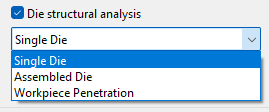
Checking this button performs a structural analysis of the die during forming and calculates the stress acting on the die.
Single Die: Die linkage not considered (refer to 2D tutorial part 2 ex. 13)Assembled Die: Consider inter-die linkage (refer to 3D tutorial part2 ex.11)Workpiece Penetration: Consider allowing material penetration into the die equivalent to the amount of die deformation
Interaction for workpiece with die
This is an option regarding the contact boundary with the die during material flow analysis. If checked, the die boundary deformed by the die structural analysis is used; if unchecked, the input rigid die boundary is used as is.
Recrystallization
If you check, the microstructure size and hardness of the material are predicted.
Material model
Rigid-plastic- In plastic deformation, if the elastic deformation is very small compared to the plastic deformation, the elastic deformation is ignored; this is called rigid plasticity.Elastoplastic- Both elastic and plastic deformation are considered simultaneously. (Springback prediction)Porous- Select this option for powder materials.
'Anisotropy'
Check this option when considering material anisotropy during elastoplastic analysis.
Flash
Regular- default valueMassively spreading (Flash/Parts > 30%)- A function that prevents the creation of many unnecessary elements in areas where a large amount of burrs occur in 3D (e.g., crankshaft forging process)
Speed & Accuracy
Default values change when creating a project.
Fast- Reduces the number of automatically generated elements and solution steps compared to the default.Regular (Recommended)- Uses the default values.Accurate- Increases the number of automatically generated elements and solution steps compared to the default.